User Guide
This section provides detailed examples of using Aerial with various configurations and use cases.
🖥️ CPU Performance: PyAerial runs fast on CPU. GPU acceleration is optional and only beneficial for very large datasets.
Looking for something specific?
🎯 Parameter tuning - See the Parameter Tuning Guide for how to get high/low support, confidence, etc.
⚙️ Configuration - See Configuration for GPU usage, logging, and custom Autoencoders
🔧 Troubleshooting - See When Things Don’t Work if Aerial can’t learn rules or takes too long
1. Association Rule Mining from Categorical Tabular Data
from aerial import model, rule_extraction
from ucimlrepo import fetch_ucirepo

# load a categorical tabular dataset from the UCI ML repository
breast_cancer = fetch_ucirepo(id=14).data.features

# train an autoencoder on the loaded table
trained_autoencoder = model.train(breast_cancer)

# extract association rules with quality metrics calculated automatically
result = rule_extraction.generate_rules(trained_autoencoder, min_rule_frequency=0.1, min_rule_strength=0.8)

# access rules and statistics
if len(result['rules']) > 0:
    print(result['statistics'])
    print(result['rules'][0])
Following is the partial output of above code:
>>> Output:
breast_cancer dataset:
     age menopause tumor-size inv-nodes  ... deg-malig  breast breast-quad irradiat
0  30-39   premeno      30-34       0-2  ...         3    left    left_low       no
1  40-49   premeno      20-24       0-2  ...         2   right    right_up       no
2  40-49   premeno      20-24       0-2  ...         2    left    left_low       no
                                         ...

Overall statistics: {
   "rule_count": 15,
   "average_support": 0.448,
   "average_confidence": 0.881,
   "average_coverage": 0.860,
   "data_coverage": 0.923,
   "average_zhangs_metric": 0.318
}

Sample rule:
{
   "antecedents": [
      {"feature": "inv-nodes", "value": "0-2"}
   ],
   "consequent": {"feature": "node-caps", "value": "no"},
   "support": 0.702,
   "confidence": 0.943,
   "zhangs_metric": 0.69,
   "rule_coverage": 0.744
}
Working with rules:
Rules are returned in a structured dictionary format with quality metrics included:
# Accessing rule components and quality metrics
for rule in result['rules']:
    # Access antecedent features
    for ant in rule['antecedents']:
        feature_name = ant['feature']  # e.g., "inv-nodes"
        feature_value = ant['value']  # e.g., "0-2"

    # Access consequent
    cons_feature = rule['consequent']['feature']  # e.g., "node-caps"
    cons_value = rule['consequent']['value']  # e.g., "no"

    # Access quality metrics (automatically calculated)
    support = rule['support']
    confidence = rule['confidence']
    zhangs_metric = rule['zhangs_metric']
    rule_coverage = rule['rule_coverage']  # antecedent support
🔁 Reproducibility: PyAerial may produce slightly different rules across runs due to the neural network training process. To get the same results every time, set a fixed seed before training:
import torch
torch.manual_seed(42)
...
trained_autoencoder = model.train(breast_cancer)
If using GPU, also add:
torch.cuda.manual_seed(42)
torch.backends.cudnn.deterministic = True
torch.backends.cudnn.benchmark = False
2. Specifying Item Constraints
Instead of performing rule extraction on all features, Aerial allows you to extract rules only for features of interest. This is called ARM with item constraints.
In ARM with item constraints, the antecedent side of the rules will contain the items of interest. However, the consequent side of the rules may still contain other feature values (to restrict the consequent side as well, see Using Aerial for Rule-Based Classification).
features_of_interest parameter of generate_rules() can be used to do that (also valid for
generate_frequent_itemsets(), see below).
from aerial import model, rule_extraction
from ucimlrepo import fetch_ucirepo

# categorical tabular dataset
breast_cancer = fetch_ucirepo(id=14).data.features

trained_autoencoder = model.train(breast_cancer)

# features of interest, either a feature with its all values (e.g., "age") or with its certain values (e.g., premeno value of menopause feature is the only feature value of interest)
features_of_interest = ["age", "tumor-size", "inv-nodes", {"menopause": 'premeno'}, "node-caps"]

result = rule_extraction.generate_rules(trained_autoencoder, features_of_interest, min_rule_frequency=0.1)
The output rules will only contain features of interest on the antecedent side:
>>> Output:
result['rules']: [
   {
      "antecedents": [
         {"feature": "menopause", "value": "premeno"}
      ],
      "consequent": {"feature": "node-caps", "value": "no"},
      "support": 0.357,
      "confidence": 0.68,
      "zhangs_metric": -0.066,
      "rule_coverage": 0.525
   },
   {
      "antecedents": [
         {"feature": "menopause", "value": "premeno"}
      ],
      "consequent": {"feature": "breast", "value": "right"},
      "support": 0.245,
      "confidence": 0.72,
      "zhangs_metric": 0.124,
      "rule_coverage": 0.525
   },
   ...
]
3. Setting Aerial Parameters
Aerial has 3 key parameters that control rule extraction:
min_rule_frequency: Controls support (how frequent patterns are) - analogous to minimum support in traditional ARMmin_rule_strength: Controls confidence and association strength - analogous to minimum confidencemax_antecedents: Maximum number of conditions in rule antecedents (complexity)
Quick example:
from aerial import model, rule_extraction
from ucimlrepo import fetch_ucirepo

breast_cancer = fetch_ucirepo(id=14).data.features
trained_autoencoder = model.train(breast_cancer)

# Adjust parameters to control rule characteristics
result = rule_extraction.generate_rules(
    trained_autoencoder,
    min_rule_frequency=0.5,  # Synonymous to minimum antecedent support threshold
    min_rule_strength=0.8,  # Synonymous to minimum confidence/association threshold
    max_antecedents=2  # Max rule length
)
Want to know which parameters to set for your specific needs?
See the Parameter Tuning Guide for detailed guidance on:
Getting high/low support rules
Getting high/low confidence rules
Controlling the number of rules
Common scenarios with examples
4. Fine-tuning Autoencoder Architecture and Dimensions
Aerial uses an under-complete Autoencoder and in default, it decides automatically how many layers to use and the dimensions of each layer (see API Reference).
Alternatively, you can specify the number of layers and dimensions in the train method to improve performance.
from aerial import model, rule_extraction, rule_quality

...
# layer_dims=[4, 2] specifies that there are gonna be 2 hidden layers with the dimensions 4 and 2, for encoder and decoder
trained_autoencoder = model.train(breast_cancer, layer_dims=[4, 2])
...
In general, lower number of parameters (layers and dimensions) leads to fewer but higher-quality rules. Introduce more parameters when not getting enough or no rules, or reduce parameters if the rules are too many and have very low support.
Training longer with the epochs parameter of the train() function also has similar impact on the final rule set as
increasing
the number of parameters.
5. Running Aerial for Numerical Values
Discretizing numerical values is required before running Aerial. PyAerial provides several discretization methods as
part of the discretization.py module. These methods can be categorized into unsupervised (no target variable
needed) and supervised (require target variable for classification tasks).
Automatic Column Filtering: All discretization methods automatically skip columns that are already discrete or categorical-like. This includes:
Binary columns (e.g., 0/1 for class labels)
Low-cardinality columns (< 5% unique values relative to total rows)
Columns with fewer unique values than the requested number of bins
When columns are skipped, an INFO-level log message will indicate which columns were filtered and why.
5.1. Unsupervised Discretization Methods
These methods work without requiring a target variable:
Equal-Frequency Discretization (Quantile-Based)
Divides data into bins with approximately equal number of samples per bin. Useful for skewed distributions.
from aerial import model, rule_extraction, discretization
from ucimlrepo import fetch_ucirepo

iris = fetch_ucirepo(id=53).data.features
iris_discretized = discretization.equal_frequency_discretization(iris, n_bins=3)

trained_autoencoder = model.train(iris_discretized, epochs=10)
result = rule_extraction.generate_rules(trained_autoencoder, min_rule_frequency=0.1, min_rule_strength=0.8)
print(f"Found {result['statistics']['rule_count']} rules")
Equal-Width Discretization
Divides the range of values into equal-width intervals. Simple and intuitive.
iris_discretized = discretization.equal_width_discretization(iris, n_bins=5)
K-Means Discretization
Uses k-means clustering to create bins based on natural clusters in the data. Interval boundaries are created at the midpoints between consecutive cluster centers.
iris_discretized = discretization.kmeans_discretization(iris, n_bins=4, random_state=42)
Quantile Discretization
Similar to equal-frequency but allows custom percentile specification.
# Using custom percentiles (quartiles)
iris_discretized = discretization.quantile_discretization(
    iris,
    percentiles=[0, 25, 50, 75, 100]
)
Custom Bins Discretization
Allows full control with user-specified bin edges for each feature.
bins_dict = {
    'sepal length (cm)': [4.0, 5.0, 6.0, 7.0, 8.0],
    'sepal width (cm)': [2.0, 2.5, 3.0, 3.5, 5.0],
    'petal length (cm)': [1.0, 2.0, 4.0, 5.5, 7.0],
    'petal width (cm)': [0.0, 0.5, 1.5, 2.0, 3.0]
}
iris_discretized = discretization.custom_bins_discretization(iris, bins_dict)
5.2. Supervised Discretization Methods
These methods use target variable information to create more informative bins for classification:
Entropy-Based Discretization (MDLP)
Uses decision tree splits to minimize entropy with respect to the target variable.
from aerial import discretization
from ucimlrepo import fetch_ucirepo

# Load dataset with target labels
iris_data = fetch_ucirepo(id=53)
features = iris_data.data.features
targets = iris_data.data.targets

import pandas as pd

df = pd.concat([features, targets], axis=1)

# Discretize using target information
df_discretized = discretization.entropy_based_discretization(df, target_col='class', n_bins=4)
ChiMerge Discretization
Merges adjacent intervals based on chi-square statistics to find optimal discretization.
df_discretized = discretization.chimerge_discretization(
    df,
    target_col='class',
    max_bins=5,
    significance_level=0.05
)
Decision Tree Discretization
Uses decision tree regression to find optimal split points based on the target variable. Works with both categorical and numerical targets.
df_discretized = discretization.decision_tree_discretization(
    df,
    target_col='class',
    max_depth=3,
    min_samples_leaf=5
)
Following is the partial iris dataset content before and after the discretization:
>>> Output:
# before discretization
   sepal length  sepal width  petal length  petal width
0           5.1          3.5           1.4          0.2
1           4.9          3.0           1.4          0.2
...

# after discretization
  sepal length  sepal width  petal length   petal width
0  (5.0, 5.27]  (3.4, 3.61]  (0.999, 1.4]  (0.099, 0.2]
1   (4.8, 5.0]   (2.8, 3.0]  (0.999, 1.4]  (0.099, 0.2]
...
6. Frequent Itemset Mining with Aerial
Aerial can also be used for frequent itemset mining besides association rules.
from aerial import model, rule_extraction, rule_quality
from ucimlrepo import fetch_ucirepo

# categorical tabular dataset
breast_cancer = fetch_ucirepo(id=14).data.features
trained_autoencoder = model.train(breast_cancer, epochs=5, lr=1e-3)

# extract frequent itemsets with support values calculated automatically
result = rule_extraction.generate_frequent_itemsets(trained_autoencoder)

# access itemsets and statistics
print(f"Found {result['statistics']['itemset_count']} itemsets")
print(f"Average support: {result['statistics']['average_support']}")
The following is a sample output:
>>> Output:

Found 15 itemsets
Average support: 0.295

Itemsets with support values:
[
   {
      'itemset': [{'feature': 'menopause', 'value': 'premeno'}],
      'support': 0.524
   },
   {
      'itemset': [{'feature': 'menopause', 'value': 'ge40'}],
      'support': 0.451
   },
   {
      'itemset': [{'feature': 'menopause', 'value': 'premeno'}, {'feature': 'age', 'value': '30-39'}],
      'support': 0.312
   },
   ...
]
7. Using Aerial for Rule-Based Classification for Interpretable Inference
Aerial can be used to learn rules with a class label on the consequent side, which can later be used for inference either by themselves or as part of rule list or rule set classifiers (e.g., from imodels repository).
This is done by setting target_classes parameter of the generate_rules function. This parameter refers to the class
label(s) column of the tabular data.
As shown in Specifying Item Constraints, we can also specify multiple target classes
and/or their specific values. ["Class1", {"Class2": "value2"}] array specifies that we are interested in all values of
Class1 and specifically value2 of Class2 in the consequent side of the rules.
import pandas as pd
from aerial import model, rule_extraction, rule_quality
from ucimlrepo import fetch_ucirepo

# categorical tabular dataset
breast_cancer = fetch_ucirepo(id=14)
labels = breast_cancer.data.targets
breast_cancer = breast_cancer.data.features

# merge labels column with the actual table
table_with_labels = pd.concat([breast_cancer, labels], axis=1)

trained_autoencoder = model.train(table_with_labels)

# generate rules with a target class(es), this learns rules that has the "target_classes" column (in this case this column is called "Class") on the consequent side
result = rule_extraction.generate_rules(trained_autoencoder, target_classes=["Class"], min_rule_strength=0.5)

if len(result['rules']) > 0:
    print(f"Generated {result['statistics']['rule_count']} classification rules")
    print(f"Average confidence: {result['statistics']['average_confidence']}")
Sample output showing rules with class labels on the right hand side:
>>> Output:

Generated 12 classification rules
Average confidence: 0.742

Sample rule:
{
   "antecedents": [
      {"feature": "menopause", "value": "premeno"}
   ],
   "consequent": {"feature": "Class", "value": "no-recurrence-events"},
   "support": 0.357,
   "confidence": 0.68,
   "zhangs_metric": -0.066,
   "rule_coverage": 0.525
}
8. Smart Defaults and Filtering
Aerial uses smart defaults when you don’t know what values to use.
8.1. Training Duration
By default, Aerial uses epochs=2 which produces fewer, higher-quality rules:
trained_autoencoder = model.train(breast_cancer) # epochs=2 by default
Why shorter training is better:
Captures only the strongest associations
Produces fewer, higher-quality rules
Avoids overfitting to noise
When to increase epochs:
Only if you’re getting no rules and suspect underfitting
Start with
epochs=3orepochs=5and observe results
8.2. Automatic Batch Size
Batch size is now automatically determined based on dataset size when not specified:
# Batch size is auto-selected based on number of rows
trained_autoencoder = model.train(breast_cancer)  # batch_size chosen automatically
Auto-selection logic:
<200 rows: batch_size=2
<500 rows: batch_size=4
<1000 rows: batch_size=8
<5000 rows: batch_size=32
≥5000 rows: batch_size=64
8.3. Filtering Rules by Quality
Post-filter rules to keep only those meeting quality thresholds:
result = rule_extraction.generate_rules(
    trained_autoencoder,
    filter_min_confidence=0.7,
    filter_min_support=0.1
)
Parameters:
filter_min_confidence: Keep only rules with confidence ≥ this valuefilter_min_support: Keep only rules with support ≥ this value
Use when:
You want to filter results without changing the extraction thresholds, and to avoid false positives
You want only high-confidence or high-support rules
8.4. Combining Parameters
Filtering works with all other parameters:
result = rule_extraction.generate_rules(
    trained_autoencoder,
    target_classes=["Class"],
    features_of_interest=["age"],
    filter_min_confidence=0.6,
    max_antecedents=2
)
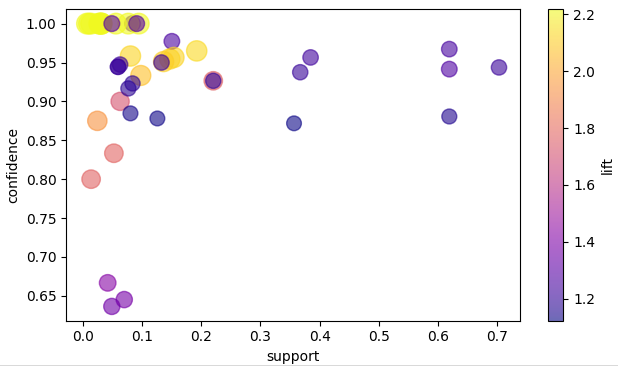
9. Visualizing Association Rules
Rules learned by PyAerial can be visualized using NiaARM library. In the
following, visualizable_rule_list() function converts PyAerial’s rule format to NiaARM RuleList() format. And then
visualizes the rules on a scatter plot using the visualization module of NiaARM
...
from niaarm.visualize import scatter_plot
from niaarm import RuleList, Feature, Rule


def visualizable_rule_list(aerial_result: dict, dataset: pd.DataFrame):
    rule_list = RuleList()
    for rule in aerial_result['rules']:
        # Convert dictionary format to NiaARM Feature format
        antecedents = [Feature(ant['feature'], "cat", categories=[ant['value']]) for ant in rule["antecedents"]]
        consequent = Feature(rule["consequent"]['feature'], "cat", categories=[rule["consequent"]['value']])
        rule_list.append(Rule(antecedents, [consequent], transactions=dataset))
    return rule_list


# learn rules with PyAerial as before
breast_cancer = fetch_ucirepo(id=14).data.features
trained_autoencoder = model.train(breast_cancer)
result = rule_extraction.generate_rules(trained_autoencoder, min_rule_frequency=0.1)

# get rules in NiaARM RuleList format
visualizable_rules = visualizable_rule_list(result, breast_cancer)
figure = scatter_plot(rules=visualizable_rules, metrics=('support', 'confidence', 'lift'), interactive=False)
figure.show()
Visualization of the PyAerial rules as a scatter plot showing their quality metrics:
Please see NiaARM for more visualization options: https://github.com/firefly-cpp/NiaARM?tab=readme-ov-file#visualization